

How to Fix Payslip Download Issues in iPhone Safari
If your payslip won’t download in Safari on your iPhone or iPad, it’s usually because Safari is blocking the download pop-up. This guide shows you how to turn off Block Pop-ups so the payslip can download.
-
Open the Settings App
Section titled “Open the Settings App”Open the main
Settingsapp on your iPhone or iPad. -
Tap Apps
Section titled “Tap Apps”Scroll down and tap
Apps. -
Tap Safari
Section titled “Tap Safari”Locate and tap
Safari. -
Turn Off Block Pop-ups
Section titled “Turn Off Block Pop-ups”Under the
Generalsection, findBlock Pop-upsand toggle it off. The switch turns gray when pop-ups are no longer blocked.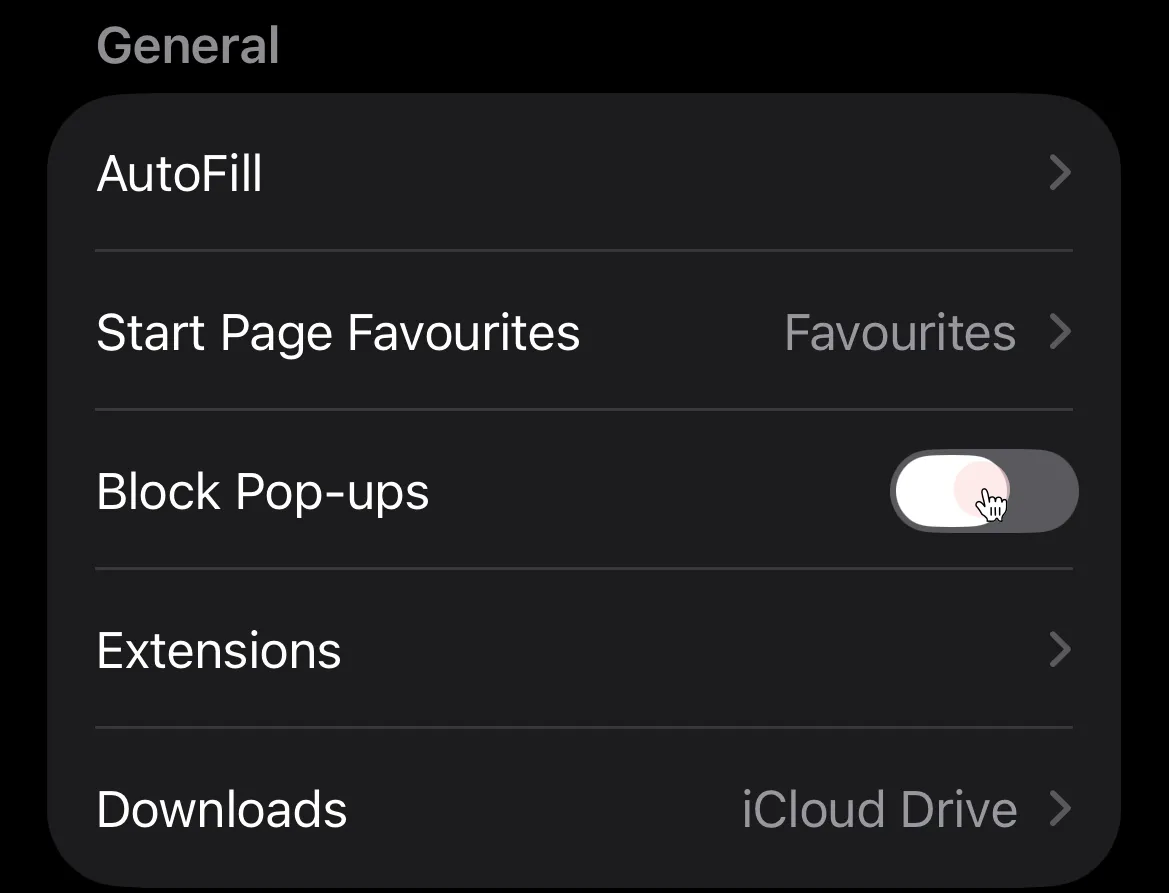
-
Return to Safari and Refresh
Section titled “Return to Safari and Refresh”Go back to
Safariand refresh the page. The payslip pop-up can now load, allowing your download to complete.